Modern accounting for your company, with no re-keying of your data
Flexbooks keeps the books of Ukrainian companies and sole proprietors (ФОП): from the payment order to the VAT return, under Ukrainian standards.
Easy automated migration from any existing 1C:Enterprise configuration. How it works.
Open the demo and see a working company's books, with no sign-up.
See for yourself
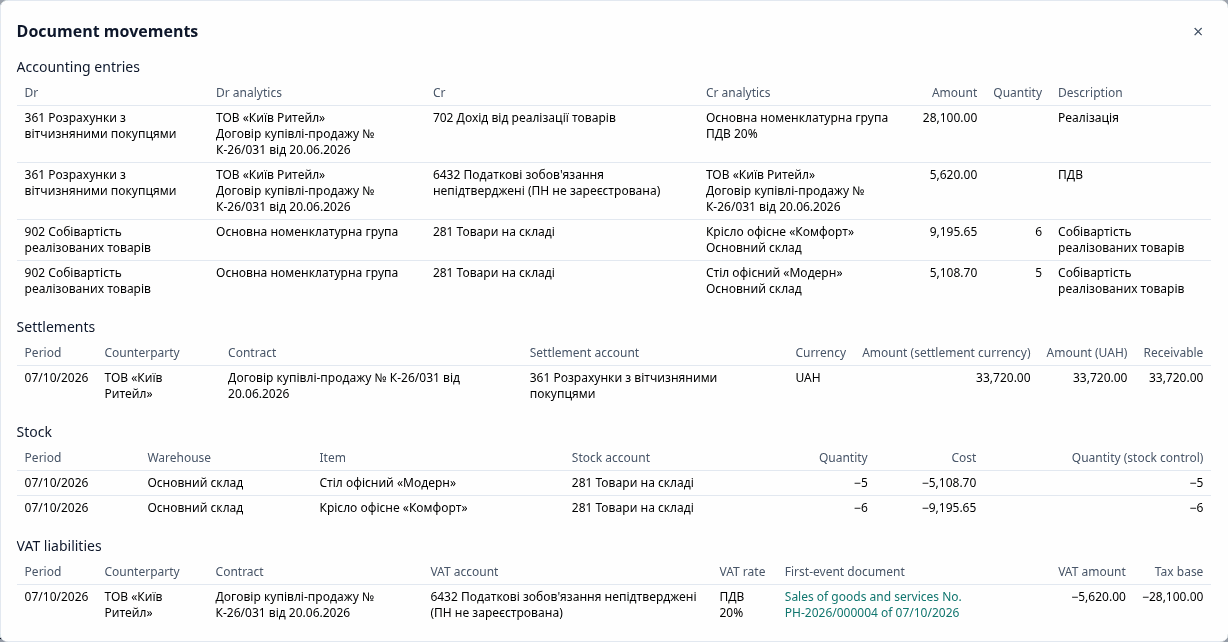
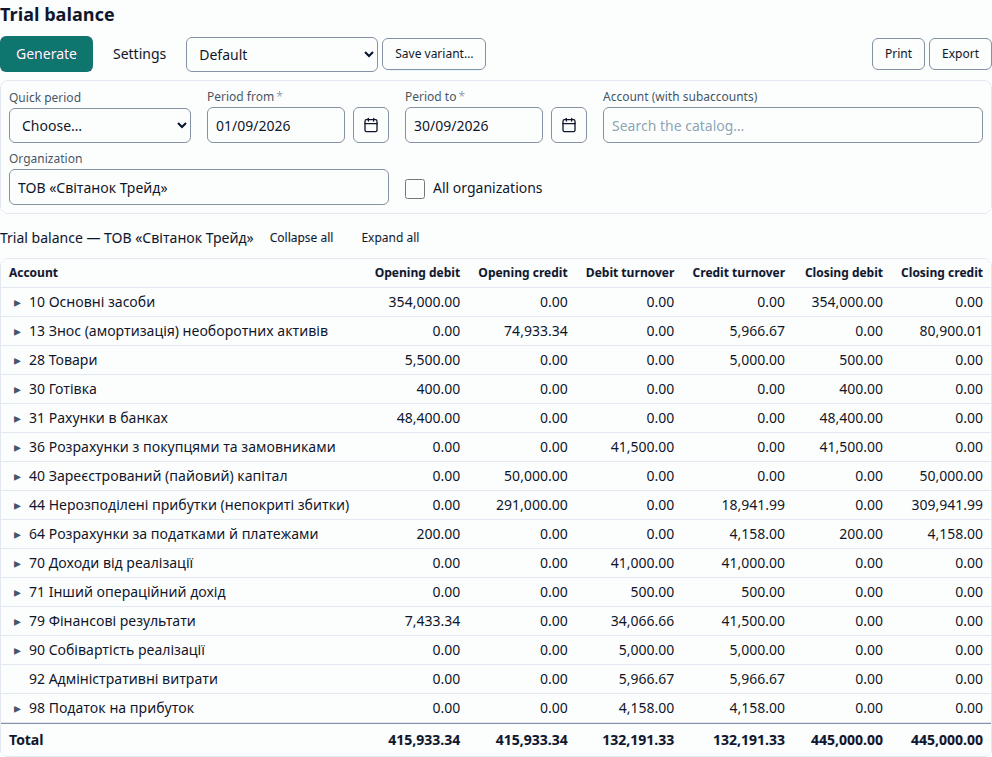
Every figure leads to a document. From the trial balance, a double click opens the account card, and from it the document itself and its entries.
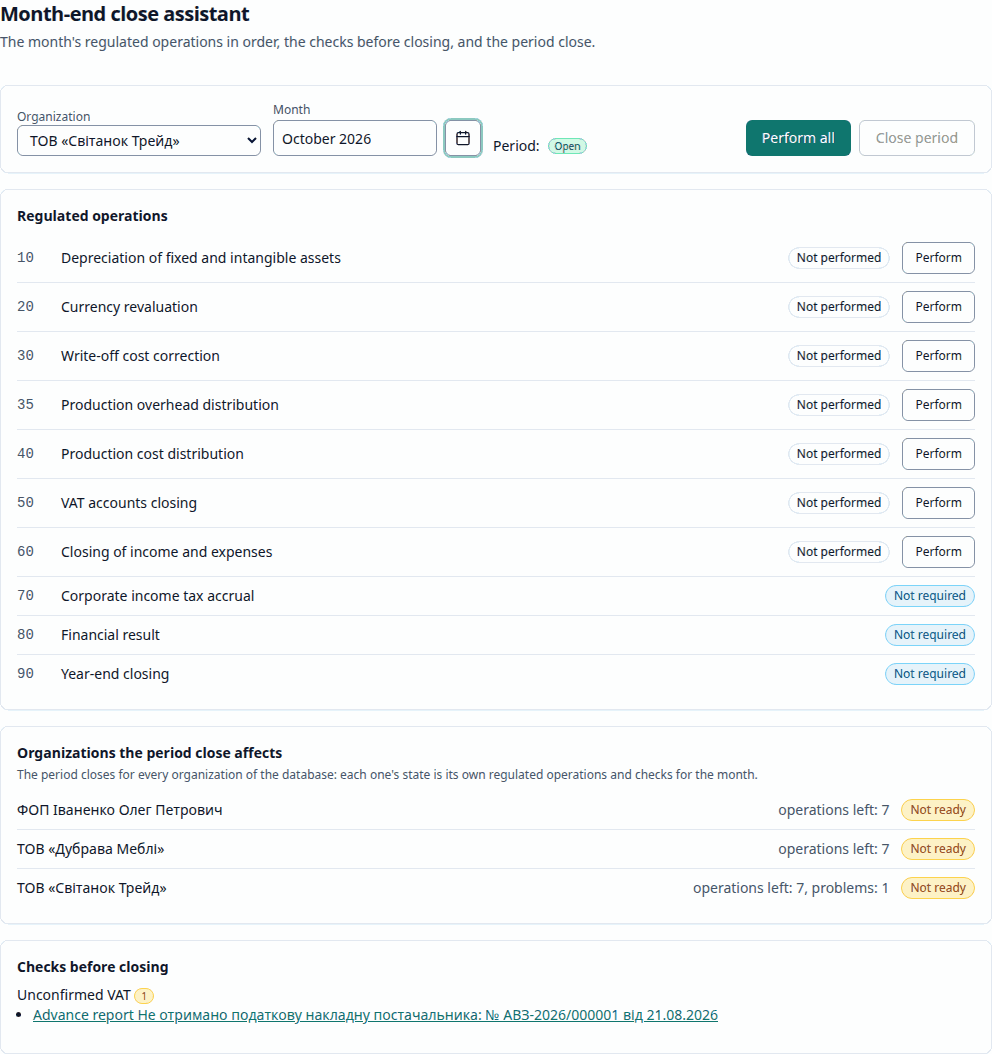
The month closed in order. The assistant runs the regulated operations, shows the checks with links to the documents and closes the period for every organization of the database.
Why Flexbooks
-
Runs in a browser
Nothing to install on workstations. Every window has a permanent link: open a document or a report in a new tab.
-
A move you can check
After the migration, the trial balance is reconciled with the 1C export by every analytical dimension. It needs a standard EnterpriseData or CommerceML export; a ready mapping template exists for BAS Бухгалтерія, and other configurations may need mapping adjustments.
-
AI prepares, you decide
A scanned invoice becomes a draft, and the assistant answers with figures and links to sources. Nothing is posted on its own. What AI does.
-
For accountants and companies
VAT payers and single-tax payers, in trade, services and production; several organizations in one database and an access profile for each role. The sections and shortcuts feel familiar if you have worked in 1C or BAS: Coming from 1C/BAS.
What Flexbooks does
-
Bank and cash
Payment orders, bank statement import, cash orders, advance reports, the cash book.
-
Sales and purchases
Invoices, sales and receipts, returns, tax invoices and VAT adjustments, reconciliation acts.
-
Warehouse and production
Transfers, write-offs, stock counts, assembly, batch accounting; material requisitions and the production close.
-
Fixed assets and payroll
Commissioning, depreciation, upgrades, disposal; HR documents, payroll accrual and payment.
-
Month-end close
The close assistant runs the regulated operations in order, checks the month and closes the period for every organization of the database.
-
Reports and regulated reporting
Trial balance, account cards and analyses, VAT reports; the VAT return, financial statements, income tax return and unified payroll report, as files for M.E.Doc, SOTA, Vchasno and the Electronic Cabinet.
Exchange with reporting systems
The files for M.E.Doc, SOTA, Vchasno and the Electronic Cabinet have not yet been checked on a real reporting system, and the formats are awaiting an accountant's approval. Check the file in your own system before you submit it. Flexbooks keeps tax invoices and VAT adjustments and reads their registration receipts, but exporting them as a file for ЄРПН, the state register (J1201016 / J1201216), is not available yet. More in Reporting exchange.
What AI does
Flexbooks can use an AI model for three things. You always check the result; nothing is posted on its own.
- Invoice recognition: a scan or photo of a supplier invoice becomes a draft receipt.
- AI assistant (
Ctrl + J): questions about balances, turnovers and documents in plain language, or a draft document from a description. - Categorization and explanations: a suggested counterparty and account for a bank statement line, "Why this value?" and "Why these entries?".
The AI sees only what you see: every tool checks your rights and works within your organizations. The data of a request goes to the model provider: exactly what is sent.
AI is off on the public demo
There, the assistant and invoice recognition answer that they are not configured; everything else works as usual. Whoever runs the server turns these features on by configuring a model provider. More in AI features.
Where to start
- Open the demo and click a role's card on the sign-in page. All the logins are also listed on the Demo page.
- Follow the half-hour first steps on the demo company's books.
- For detail: the user manual, the administrator guide and the FAQ.
After the demo
Flexbooks is distributed under the AGPL-3.0 license: you may use and change the program, and whoever offers a changed version to others, including over a network, must give them its source code. Prices, how to get it and contacts are not published on this site yet; they will appear here.