Reports
The Reports (Звіти) section holds the standard accounting reports, settlement and VAT reports, and Regulated reporting (Регламентована звітність). Every report is placed here by default; section reports (for example, warehouse or payroll ones) are also available in their sections. For how to work with the report window, see Report window.
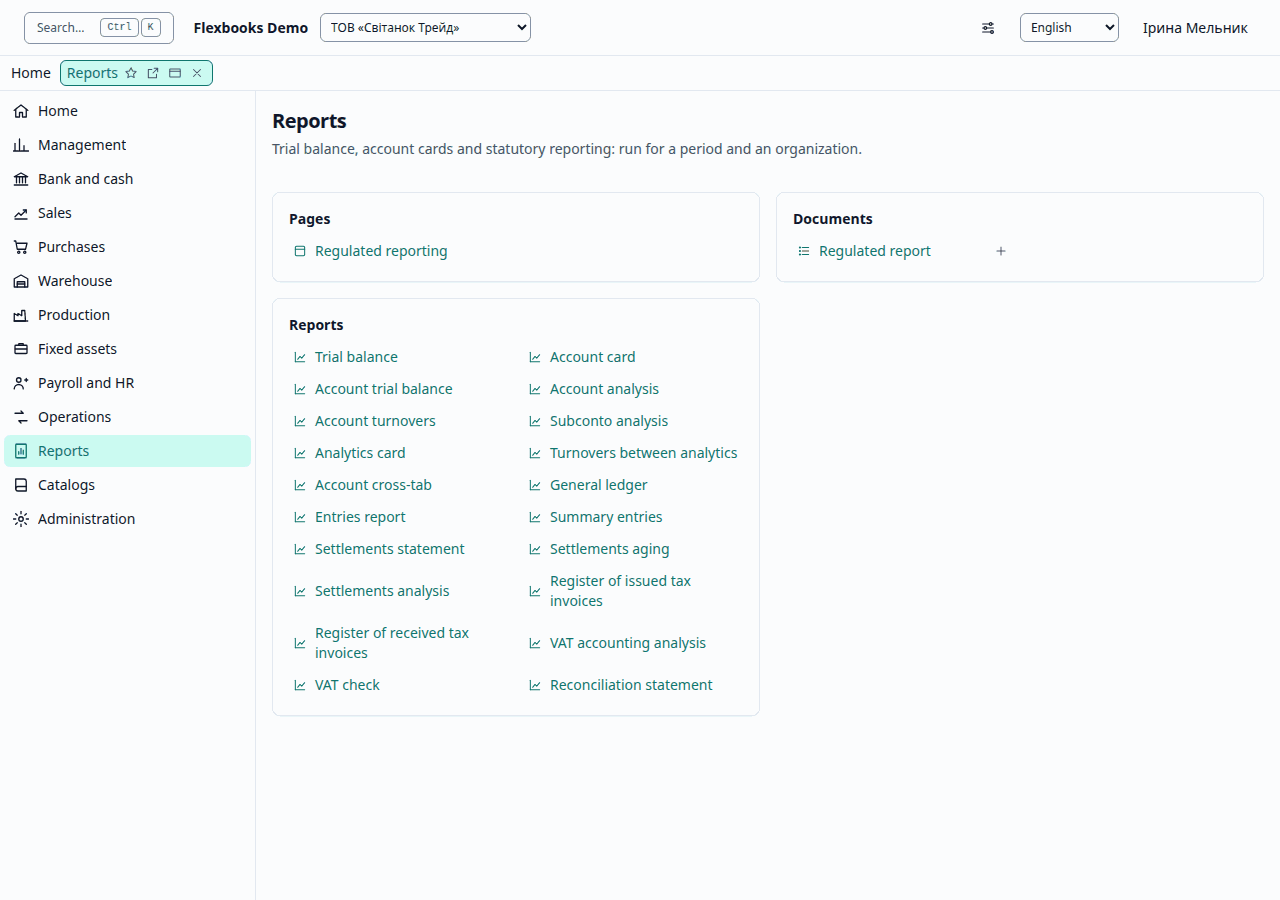
These groups are in the functions panel at the side once you open any list of the section; the section's own page, pictured above, gathers the same links into cards by kind: documents, journals, reports.
| Group | What it contains |
|---|---|
| Important | Trial balance, Regulated reporting |
| More in this section | Account card; standard reports; settlement reports; VAT reports (below) |
Standard accounting reports
Trial balance (Оборотно-сальдова відомість), Account trial balance (Оборотно-сальдова відомість по рахунку), Account analysis (Аналіз рахунку), Account card (Картка рахунку), Account turnovers (Обороти рахунку), Subconto analysis (Аналіз субконто), Analytics card (Картка субконто), Turnovers between analytics (Обороти між субконто), Account cross-tab (Шахова відомість), General ledger (Головна книга), Entries report (Звіт за проводками), Summary entries (Зведені проводки). The reports are built from the accounting register and agree with each other: an account's turnovers and balances are the same in the trial balance, the account trial balance, the account card and the general ledger.
- Trial balance — opening balances, turnovers and closing balances by account; the debit and credit totals are equal. A row's drill-down opens the Account card, and from the card, the document.
- Account card — the account's movements in date order with a running balance.
Settlement reports
Settlements statement, Settlements aging, Settlements analysis, Reconciliation statement — see Sales.
VAT reports
- Register of issued tax invoices (Реєстр виданих податкових накладних), Register of received tax invoices (Реєстр отриманих податкових накладних).
- VAT accounting analysis (Аналіз стану податкового обліку з ПДВ) — compares VAT by documents with VAT by tax documents and marks a Difference.
- VAT check (Перевірка ПДВ) — a list of VAT checks with the documents that fail them.
Regulated reporting
The Regulated reporting window prepares regulated reports, checks them and exports the exchange file for the tax authority.
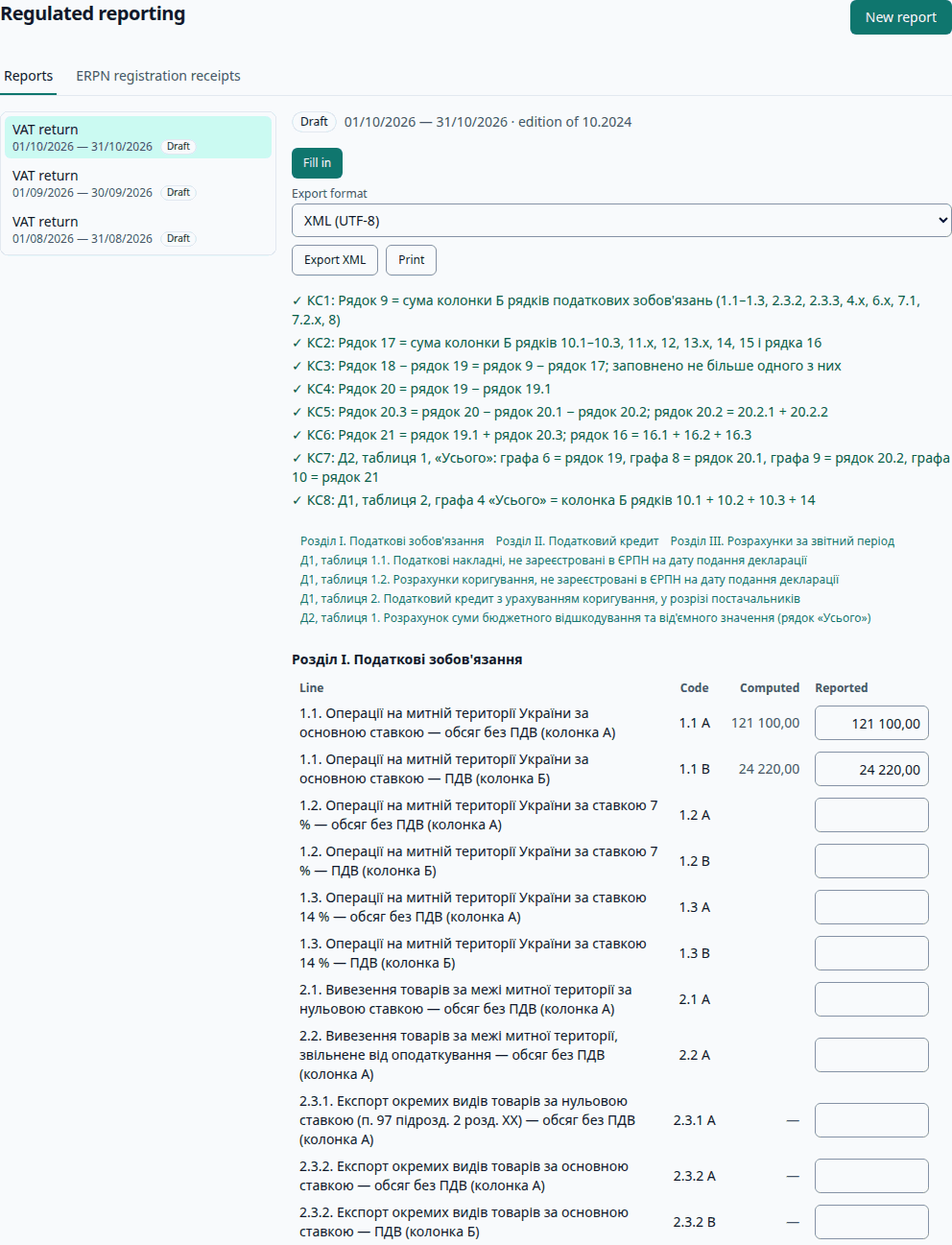
Reports: VAT return (Податкова декларація з податку на додану вартість); Financial statements (forms 1, 2), small enterprise statements (forms 1-м, 2-м) and micro enterprise statements (forms 1-мс, 2-мс); Corporate income tax return (Податкова декларація з податку на прибуток підприємств); Single tax return of a legal entity (group 3) (Податкова декларація платника єдиного податку — юридичної особи (третя група)); Unified personal income tax and social contribution report (Податковий розрахунок сум доходу, ПДФО, військового збору та ЄСВ, with annexes Д1, 4ДФ).
- Choose the Report, Period from and Period to, and click Create report. The report is computed with the form version in force in that period, from the organization's documents.
- The report shows the indicators (Code, Computed, Reported). You can enter a value manually; if the computation then changes under a manual value, the row is marked Computation changed. Table annexes (for example, Д1) are shown row by row; you can add a row manually. Fill in recalculates the report.
- Control ratios show which checks have passed.
- Export XML — the file is validated against the form's XSD schema; a file that does not match the schema is not exported. If a control ratio is not met, a computation changed under a manual value, or the form version is not yet approved in the compliance registry, the window shows warnings: the export is possible after confirmation ("I have reviewed the warnings and confirm the export"), and the submission records who confirmed and when.
- Export format — XML (UTF-8) or a file for the reporting system (M.E.Doc, SOTA, Vchasno, the Electronic Cabinet): the same file in windows-1251 encoding with a name following the State Tax Service (ДПС) rules.
- Print — the printed form of the report.
Report state: Draft (Підготовлено) → Exported → Accepted / Rejected. An exported report is locked for changes.
Signing and submission
Flexbooks does not sign or send reports: the qualified electronic signature and sending are done in the reporting system. Load the file into the reporting system, sign it and send it.
Receipt
Paste the receipt text into the Receipt field and click Import receipt: the report becomes Accepted or Rejected. A receipt of another taxpayer, form or period is rejected; if the receipt does not contain the report's details, confirm which submission it belongs to. The report's submissions and their receipts are listed under Submissions.
Correcting an accepted report
Choose the submission type — New original (Звітний новий) or Clarifying (Уточнюючий) — and click Back to draft: the next export will be a new submission of this type.
ERPN registration receipts
Paste the receipt on the registration of tax invoices and VAT adjustments in the ERPN (ЄРПН, the Unified Register of Tax Invoices) (from M.E.Doc, SOTA, Vchasno, the Electronic Cabinet) and click Apply receipt. The documents with this number and date of the seller organization named in the receipt get the state, registration number and registration date. If the receipt does not name the seller, choose the Seller organization. A result is shown for each document: registration state updated, document not found, several documents found, receipt of another seller — not applied, or the period is closed / the restriction date applies.
Not yet checked on a real system. The exchange formats (file name, encoding, receipts) are still awaiting the accountant's sign-off and a check with a test account of the reporting system. Exporting the exchange files of the tax invoices themselves (J1201016 / J1201216) from a posted document is not available yet.