Roles and access profiles
Model
A right is an object and an action. Objects are documents, catalogs, registers, reports, journals and system areas (users, settings, periods, operations, audit, imports, integrations, migration, AI, the start page). Actions are read, create, update, post, unpost, delete, mark for deletion, view reports and administer. Two special rights exist: every organization (e.g. All organizations (Усі організації) in lists and reports) and editing despite the editing restriction date.
A role is a set of rights; a profile is a set of roles. A member's effective rights are the union of the roles of all its profiles. An account flagged as superuser bypasses every right check. The application always has the profile Administrator (Адміністратор) with the role Повні права (full rights: every right and both special rights).
Ready-made profiles
| Profile | Roles |
|---|---|
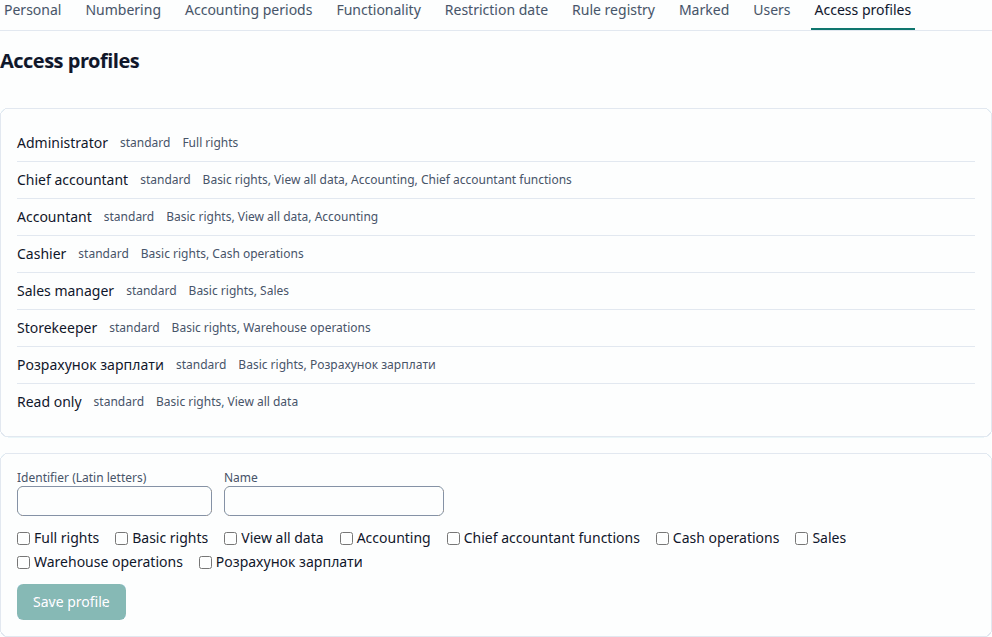
| Administrator (Адміністратор) | Повні права (full rights) |
| Chief accountant (Головний бухгалтер) | Basic rights, View all data, Bookkeeping, Chief accountant functions |
| Accountant (Бухгалтер) | Basic rights, View all data, Bookkeeping |
| Cashier (Касир) | Basic rights, Cash operations |
| Sales manager (Менеджер з продажу) | Basic rights, Sales |
| Storekeeper (Комірник) | Basic rights, Warehouse operations |
| Payroll clerk (Розрахунок зарплати) | Basic rights, Payroll |
| Read only (Тільки перегляд) | Basic rights, View all data |
The notable rights of the roles:
| Role | Notable rights |
|---|---|
| Basic rights (Базові права) | read the common catalogs, the start page and the AI features |
| View all data (Перегляд усіх даних) | read everything, view every report, every organization |
| Bookkeeping (Ведення бухгалтерського обліку) | every document action, catalog writes, imports and integrations; read periods and settings |
| Chief accountant functions (Функції головного бухгалтера) | administer periods, settings and operations; read the audit log; the policy registers; edit despite the editing restriction date |
| Cash operations, Sales, Warehouse operations, Payroll | the documents, catalogs and reports of their area |
No other role grants the administration of users or of the migration: only the Administrator profile (or a superuser) manages users and runs a 1C migration. A cashier posts cash orders; a read-only member creates nothing.
Managing users
Administration → Users (Адміністрування → Користувачі) and Access profiles (Профілі доступу) need the right to administer users.
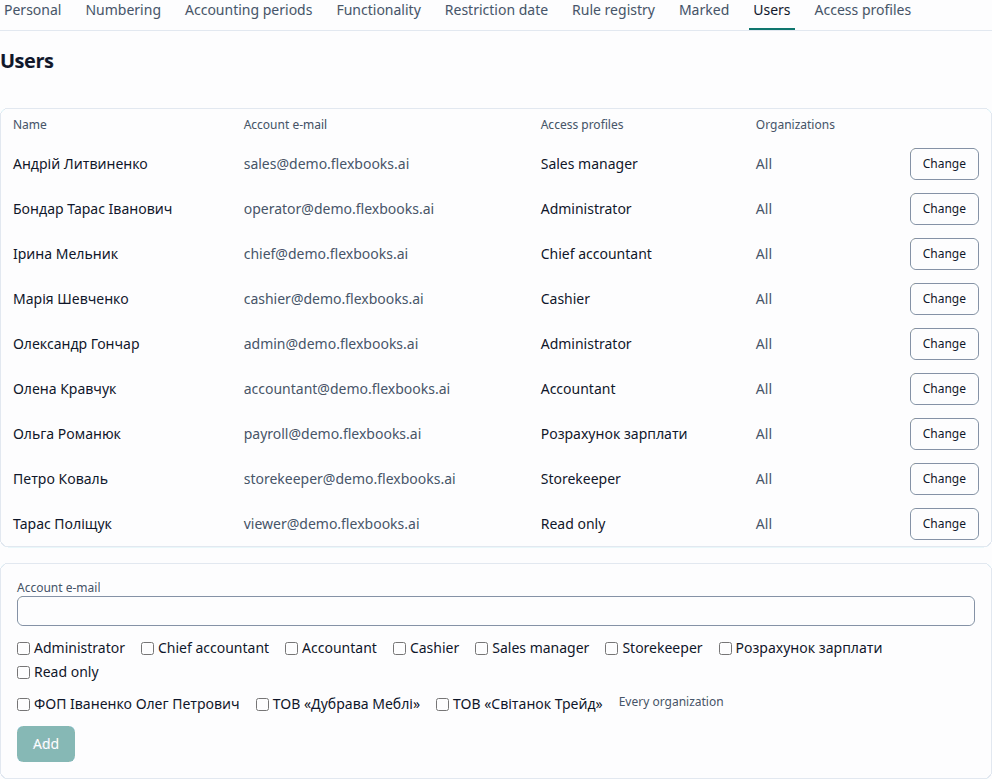
- Add a user links an existing account by its e-mail, with its profiles and its organizations (Every organization or Only the ticked ones). Accounts are created by registration (the sign-in screen's link).
- A member's profiles and organizations are changed on its row; the remove-from-base command on the same row removes it.
- Access profiles lists the predefined profiles and the custom ones; a custom profile is an identifier, a name and its roles. Custom profiles apply to the whole database, so only an administrator not limited to some organizations changes them.
Rules the application keeps (every change is audited):
- a member always holds at least one profile;
- at least one active administrator remains, and one of them is not limited to organizations;
- an administrator limited to some organizations manages only members restricted within its own organizations; it cannot lift a restriction or add an unrestricted member.