Migration from 1C: how it works
Moving to Flexbooks does not mean re-keying your data. Easy automated migration from any existing 1C:Enterprise or BAS configuration transfers catalogs, opening balances, documents and, if you want, the entry history — and reconciles what it wrote with 1C.
-
A standard export
All it needs is the exchange XML your 1C already produces: EnterpriseData (1C 8.x) or CommerceML 2. No changes to the configuration, no access to the 1C database.
-
Automatic mapping
Flexbooks analyzes the file and maps accounts and analytics with a ready-made template for BAS Бухгалтерія; you only adjust the differences and save the profile for the next sessions.
-
The plan first
The preview shows what will be created before anything is written. The run then writes straight into the working database; failed records can be retried on their own.
-
Reconciled with 1C
The trial balance by analytics at the cut-over date is compared with 1C; every difference leads to the counterparty, contract or item and to the documents.
What it needs
A standard export of your configuration: EnterpriseData or CommerceML 2. A ready mapping template exists for BAS Бухгалтерія (1С:Бухгалтерія for Ukraine); other configurations may need adjustments to the account and field mapping. CommerceML carries only goods, offers and counterparties; balances, documents and entries move through EnterpriseData.
Six steps
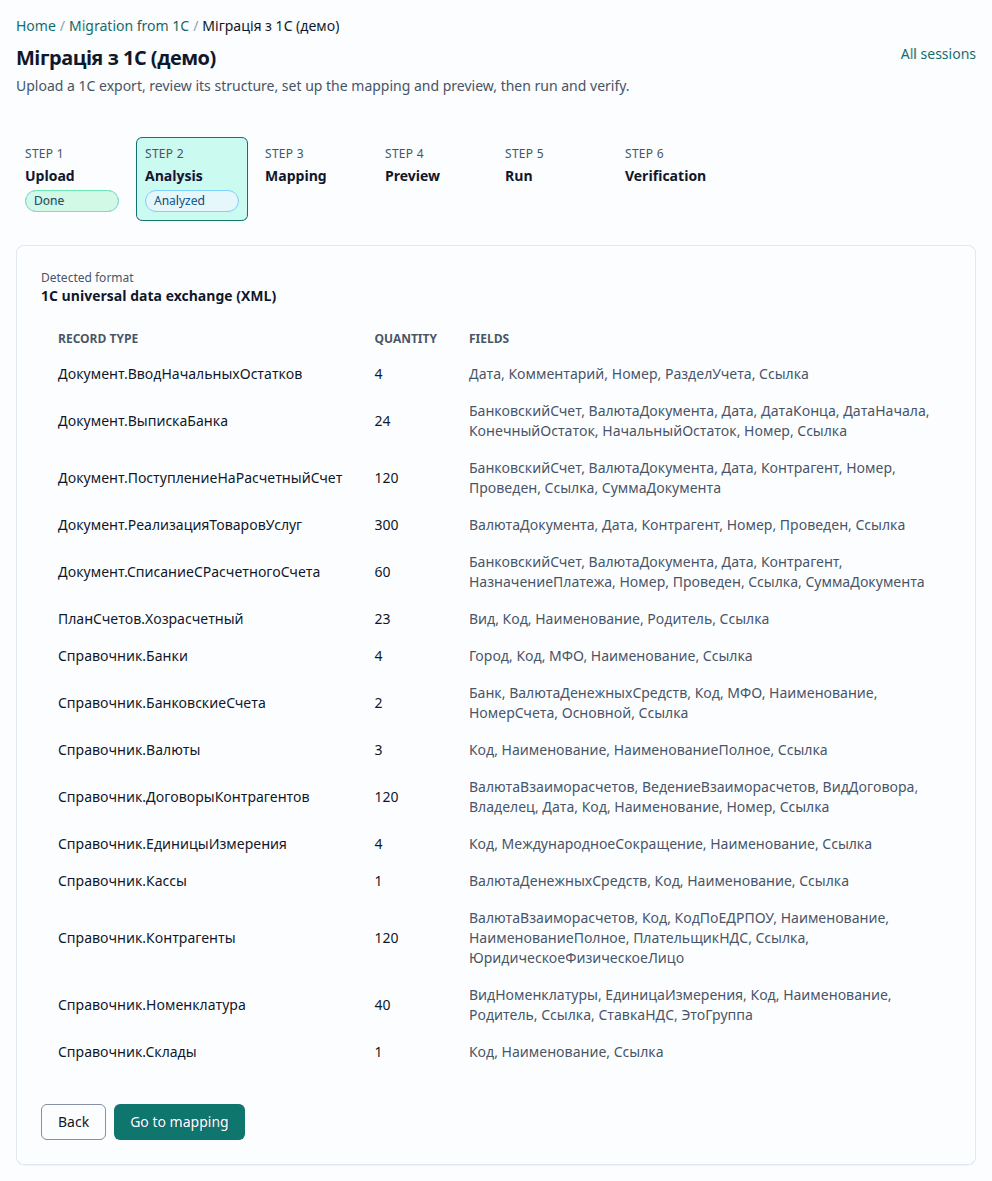
An administrator runs the migration in Administration → Migration from 1C:
- Upload — the 1C export XML file.
- Analysis — the record types found and their counts.
- Mapping — 1C accounts and fields and their Flexbooks counterparts, the chart of accounts translation, the cut-over date.
- Preview — what will be created. Nothing in your data has changed so far.
- Run — records are created in the working database at once, in dependency order: catalogs first, then balances and documents in date order. Flexbooks posts the documents itself, with all its checks.
- Verification — the reconciliation report and Approve migration.
A run cannot be undone automatically
There is no separate trial copy: Run writes straight into the working database, updates existing catalog entries with the same codes and posts documents. Approve migration only completes the session. Before a run on real data, back up the database or try the export on a separate copy. In detail: what is written, and when.
What is transferred
- Catalogs: currencies, units of measure, banks, the chart of accounts, organizations, individuals, divisions, warehouses, employees, cost and cash-flow items, price types, items, counterparties, contracts, bank accounts, cash desks, fixed assets with their parameters.
- Accounting policy and item accounts.
- Opening balances by section: settlements by counterparty, contract and document, goods by item and warehouse, fixed assets, payroll by employee, VAT.
- Documents: receipts and sales, returns, tax invoices and VAT adjustments, cash orders, advance reports, warehouse and fixed asset documents, payroll accruals, manual operations, prices, payments and bank statements.
- "As is" history: with a cut-over date, the 1C entries before it are transferred exactly as they are in 1C, and Flexbooks posts the documents after it.
The full list and order are in the manual: Migration from 1C: step by step.
Cut-over date and history
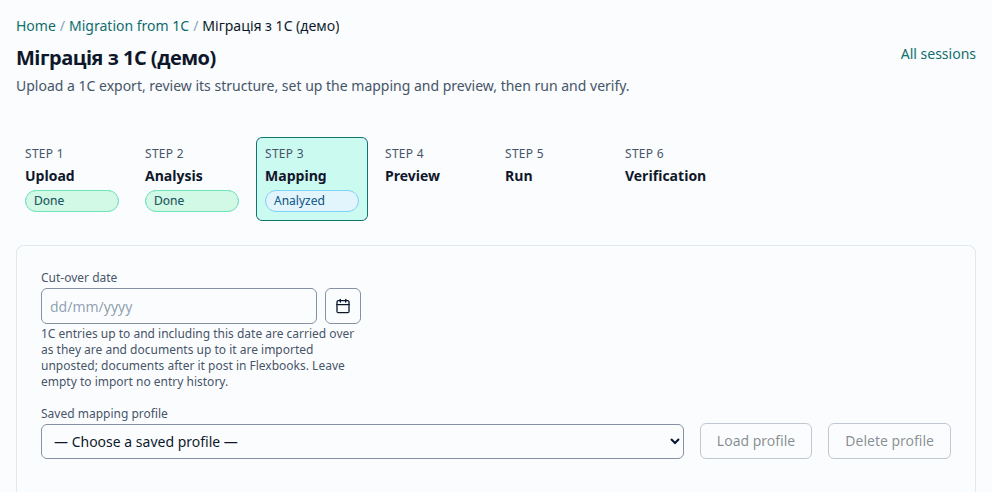
The cut-over date (dd/mm/yyyy) sets where Flexbooks starts keeping the books itself. The 1C entries up to and including that date are transferred as is — one operation per 1C document, with accounts and analytics mapped by the profile (the BAS Бухгалтерія template); the 1C documents of that period arrive unposted so that no entry is doubled. Without a cut-over date, catalogs, balances and documents are transferred, but not the entry history.
Reconciliation and approval
The Verification step compares the transferred balances with the 1C export by account and by the trial balance by analytics — each account by the analytics 1C keeps it by. The data is already written by then. If everything matches, the migration is approved at once; differences are shown down to the document, and approving with differences needs an explicit confirmation, which is recorded.
This step is not pictured here: the demo keeps a session with the sample export analyzed only, and the reconciliation report appears after a run.
Customized configurations
If your 1C configuration is customized, the data moves the same way, through the standard
EnterpriseData or CommerceML export, with the field mapping set up for it. For integrators who
carry over their own logic, Flexbooks has an AI-assisted translation of 1C modules to
TypeScript: it analyzes the modules (.bsl) and proposes code for a custom application, and the
developer reviews and accepts every proposal.
Where to go next
- The user manual: Migration from 1C: step by step — the wizard step by step.
- The administrator guide: Migration from 1C: for administrators — rights, formats, session phases.
- Where things are in Flexbooks: Coming from 1C/BAS.
- See the analyzed sample in the demo with the administrator account: an export that holds no real data.